Contents Menu Expand Light mode Dark mode Auto light/dark, in light mode Auto light/dark, in dark mode Skip to content
HermesPy
Logo
HermesPy
  • HermesPy
  • Installation
  • Getting Started
  • Tutorials
    • Implementing Channels
    • Implementing FEC codings
    • Using Beamformers
    • Implementing Beamformers
    • Implementing Communication Waveforms
    • Implementing Precodings
    • Receiver Operating Characteristics
    • Recording Datasets
    • Using Audio Equipment
    • Implementing Evaluators
  • HermesPy API
    • Communication
      • Waveforms
        • Single Carrier
          • FMCW
          • Raised Cosine
          • Rectangular
          • Root Raised Cosine
        • Orthogonal
          • OFDM
            • OFDM Synchronization
            • OFDM Waveform
            • Schmidl Cox Pilot
            • Schmidl Cox Synchronization
          • OCDM
          • OTFS
          • Waveform
          • Grid Element
          • Resource
          • Section
          • Guard Section
          • Pilot Section
          • Symbol Section
        • C-FSK
        • Synchronization
          • Correlation
        • Channel Estimation
        • Channel Equalization
          • Zero-Forcing
        • Pilot Symbol Sequence
      • Evaluators
        • Bit Error Rate
        • Block Error Rate
        • Frame Error Rate
        • Throughput
        • Error Vector Magnitude
        • Communication Evaluator
      • Communication Precoding
        • Discrete Fourier Transform
        • Maximal Ratio Combining
        • Single Carrier Decoding
        • Space-Time Block Codes
        • Symbol Precoding
      • Symbols
      • Bit Sources
      • Transmitting Modem
      • Receiving Modem
      • Simplex Link
      • Duplex Modem
      • Base Modem
      • Transmission
      • Transmission Frame
      • Reception
      • Reception Frame
      • Mapping
      • Frame Generation
      • 5G New Radio
        • 5GNR Frame
        • 5GNR Slot
        • 5GNR Subframe
    • Sensing
      • Radar
      • Radar Reception
      • Radar Transmission
      • Radar Waveform
        • FMCW
      • Radar Cube
      • Radar Detector
        • Threshold
        • Max
      • Point Detection
      • Radar Point Cloud
      • Radar Evaluator
        • Detection Probability Evaluator
        • Reiver Operating Characteristic
        • Root Mean Square Error
    • Channel Modeling
      • Channel
      • Channel Realization
      • Channel Sample
      • Link State
      • Ideal Channel
      • Multipath Fading
        • Cost 259
        • Exponential
        • 5G TDL
        • Antenna Correlation
        • Multipath Fading Channel
        • Multipath Fading Realization
        • Multipath Fading Sample
      • 3GPP Cluster Delay Line Models
        • Static CDL
        • Indoor Factory
        • Indoor Office
        • Rural Macrocells
        • Urban Macrocells
        • Urban Microcells
      • Delay Channels
        • Spatial Delay Channel
        • Random Delay Channel
      • Radar Channels
        • Single Target
        • Multi Target
      • Quadriga
      • SionnaRT Channel
      • Spatial Consistency
    • Simulation
      • Simulation
      • Devices
        • Device Output
        • Receive Realization
        • Device Reception
        • Device Transmission
        • Processed Input
      • Radio-Frequency Hardware Modeling
        • Radio-Frequency Chain
        • Radio-Frequency Block
        • RF Blocks
          • Analog-Digital Conversion
          • Amplifiers
          • Filters
          • Mixers
          • Ramp Generators
          • Phase Shifters
          • Frequency Sources
          • Splitters
          • Combiners
          • Frequency Multipliers
        • Front-End Presets
          • Ettus X410
          • Texas Instruments xWR1843
        • Noise
          • Noise Model
          • Noise Level
          • Phase Noise
        • RF Signal Model
      • Animation
      • Antennas
        • Antenna Arrays
          • Custom Array
          • Uniform Array
        • Antenna
          • Dipole
          • Ideal Isotropic
          • Linear
          • Patch
      • Synchronization
        • Trigger Model
        • Trigger Realization
        • Static Trigger
        • Random Trigger
        • Sample Offset Trigger
        • Time Offset Trigger
        • Normal Trigger
      • Mutual Coupling
        • Perfect Coupling
        • Impedance Coupling
        • Coupling
      • Isolation
        • Isolation
        • Perfect Isolation
        • Selective Leakage
        • Specific Isolation
      • Evaluators
        • Sidelobe Level
        • Self-Interference
      • Simulation Scenario
      • Scenario Visualization
      • Scenario Visualizer
      • Simulated Drop
      • Device Focus
    • Hardware Loop
      • Hardaware Loop
      • Physical Scenario
      • Physical Device
      • Physical Device Dummy
      • Physical Scenario Dummy
      • Hardware Loop Plot
      • Visualization
      • USRP Device
      • USRP System
      • Audio Device
      • Audio Scenario
      • Delay Calibration
      • Leakage Calibration
      • Antenna Calibration
    • Core
      • PyMonte
        • Actors
        • Artifact
        • Evaluation
        • Simulation Grid
        • Monte Carlo
        • Scalars
      • Device Model
        • DSP Result
        • Device Input
        • Device Output
        • Device Reception
        • Device Transmission
        • Mixing Operator
        • Processed Device Input
        • Receiver
        • DSP Reception
        • DSP Transmission
        • Transmitter
      • Wireless Scenario
      • Signal
      • Antenna Descriptions
      • Channel State Information
      • Drop
      • Serialization
      • Core Evaluators
        • PAPR
        • Receive Power Evaluator
        • Signal Extraction
        • Transmit Power Evaluator
      • Hooks
      • Extra Operators
      • Precoding
      • Random Graph
      • State
      • Coordinate System
      • Visualization
      • Executable
      • Pipeline
      • Logarithmics
      • General Definitions
    • Error Correction
      • Coding Pipeline
      • BCH Coding
      • Interleaving
      • Cyclic Redundancy Checks
      • Low Differential Parity Checks
      • Polar Coding
      • Repetition Coding
      • Reed-Solomon Coding
      • RSC Coding
      • Scrambling
      • Turbo Coding
    • JCAS
      • Matched Filtering
      • OFDM Radar
      • Duplex JCAS Operator
    • Beamforming
      • Beamformer
      • Conventional Beamformer
      • Capon Beamformer
      • Null Steering Beamformer
    • Tools
      • Math Tools
      • Resampling Routines
      • Tile Figures
  • Matlab
  • References
  • For Developers
  • License
Back to top
View this page

Simplex Link

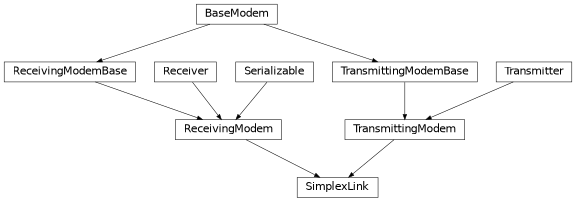
Inheritance diagram of hermespy.modem.modem.SimplexLink

Simplex links represent the signal processing chain of a unidirectional communication betweeen a transmitting device and a receiving device, implementing the digital signal processing before digital-to-analog conversion and after analog-to-digital conversion, respectively. They are a combination of a Transmitting Modem and a Receiving Modem.

After a SimplexLink is added as a type of Transmitter to a Device, a call to Device.transmit will be delegated to TransmittingModem._transmit(). Similarly, after a SimplexLink is added as a type of Receiver to a Device, a call to Device.receive will be delegated to ReceivingModem._receive()

 1# Initialize a new simulation considering a single device
 2simulation = Simulation()
 3tx_device = simulation.new_device(carrier_frequency=1e10, oversampling_factor=4, bandwidth=1e6)
 4rx_device = simulation.new_device(carrier_frequency=1e10, oversampling_factor=4, bandwidth=1e6)
 5
 6# Configure the links's waveform
 7waveform = RootRaisedCosineWaveform(
 8    num_preamble_symbols=16,
 9    num_data_symbols=32,
10    modulation_order=64,
11)
12
13# Configure the link to connect both devices
14link = SimplexLink(waveform=waveform)
15link.connect(tx_device, rx_device)
16
17# Configure a custom bits source for the modem

For a detailed description of the transmit and receive routines, refer to the Transmitting Modem and a Receiving Modem of the base classes.

The barebone configuration can be extend by additional components such as Custom Bit Sources, Synchronization, TransmitSignalCoding, ReceiveSignalCoding, Channel Estimation, TransmitSymbolCoding, ReceiveSymbolCoding, Channel Equalization and Bit Encoders:

 1# Configure the links's waveform
 2waveform = RootRaisedCosineWaveform(
 3    num_preamble_symbols=16,
 4    num_data_symbols=32,
 5    modulation_order=64,
 6)
 7
 8# Configure the link to connect both devices
 9link = SimplexLink(waveform=waveform)
10link.connect(tx_device, rx_device)
11
12# Configure a custom bits source for the modem
13link.bits_source = RandomBitsSource(seed=42)
14
15# Configure the waveform's synchronization routine
16link.waveform.synchronization = SingleCarrierCorrelationSynchronization()
17
18# Add a custom stream precoding to the modem
19link.transmit_signal_coding[0] = ConventionalBeamformer()
20link.receive_signal_coding[0] = ConventionalBeamformer()
21
22# Add a custom symbol precoding to the modem
23link.transmit_symbol_coding[0] = DFT()
24link.receive_symbol_coding[0] = DFT()
25
26# Configure the waveform's channel estimation routine
27link.waveform.channel_estimation = SingleCarrierLeastSquaresChannelEstimation()
28
29# Configure the waveform's channel equalization routine
30link.waveform.channel_equalization = SingleCarrierZeroForcingChannelEqualization()
31
32# Add forward error correction encodings to the transmitted bit stream
33link.encoder_manager.add_encoder(RepetitionEncoder(32, 3))
34link.encoder_manager.add_encoder(BlockInterleaver(192, 32))
35
class SimplexLink(selected_transmit_ports=None, selected_receive_ports=None, carrier_frequency=None, bits_source=None, transmit_symbol_coding=None, receive_symbol_coding=None, transmit_signal_coding=None, receive_signal_coding=None, encoding=None, waveform=None, frame_generator=None, seed=None)[source]

Bases: TransmittingModem, ReceivingModem

Convenience class to manage a simplex communication link between two dedicated devices.

Parameters:
  • selected_transmit_ports (Sequence[int] | None) – Indices of antenna ports selected for transmission from the operated Device's antenna array. If not specified, all available ports will be considered.

  • selected_receive_ports (Sequence[int] | None) – Indices of antenna ports selected for reception from the operated Device's antenna array. If not specified, all available ports will be considered.

  • carrier_frequency (float | None) – Carrier frequency of the transmitted and received communication signals.

  • bits_source (BitsSource | None) – Source configuration of communication bits transmitted by this modem. Bits are randomly generated by default.

  • transmit_symbol_coding (TransmitSymbolCoding | Sequence[TransmitSymbolEncoder] | None) – Complex communication symbol coding configuration during transmission.

  • receive_symbol_coding (ReceiveSymbolCoding | Sequence[ReceiveSymbolDecoder] | None) – Complex communication symbol coding configuration during reception.

  • transmit_signal_coding (TransmitSignalCoding | Sequence[TransmitStreamEncoder] | None) – Stream MIMO coding configuration during signal transmission.

  • receive_signal_coding (ReceiveSignalCoding | Sequence[ReceiveStreamDecoder] | None) – Stream MIMO coding configuration during signal reception.

  • encoding (EncoderManager | Sequence[Encoder] | None) – Bit coding configuration.

  • waveform (CommunicationWaveform | None) – The waveform to be transmitted by this modem.

  • frame_generator (FrameGenerator | None) – Frame generator used to pack and unpack communication frames. If not specified, a stub generator will be assumed.

  • seed (int | None) – Seed used to initialize the pseudo-random number generator.

classmethod Deserialize(process)[source]

Deserialize an object’s state.

Objects cannot be deserialized directly, instead a Factory must be instructed to carry out the deserialization process.

Parameters:

process (DeserializationProcess) – The current stage of the deserialization process. This object is generated by the Factory and provides an interface to deserialization methods supporting multiple backends.

Return type:

SimplexLink

Returns:

The deserialized object.

connect(transmitting_device, receiving_device)[source]

Connect two devices by this simplex link.

Convenience method that assigns this DSP layer as a transmitter to the transmitting device and as a receiver to the receiving device.

Parameters:
  • transmitting_device (Device) – Device transmitting over the simplex link.

  • receiving_device (Device) – Device receiving over the simplex link.

Return type:

None

serialize(process)[source]

Serialize this object’s state.

Objects cannot be serialized directly, instead a Factory must be instructed to carry out the serialization process.

Parameters:

process (SerializationProcess) – The current stage of the serialization process. This object is generated by the Factory and provides an interface to serialization methods supporting multiple backends.

Return type:

None

Next
Duplex Modem
Previous
Receiving Modem
Copyright © 2024, Barkhausen Institut gGmbH
Made with Sphinx and @pradyunsg's Furo